Updated October 2026
Video revision request form for clients (free template)
A revision request form is one sheet your client fills in to use a round of changes: which version they watched, which round this is, and one line per change with a timecode. It stops feedback arriving in pieces and gives you a record of what was asked. Copy the form below or download it as a Word file, and send it with your first cut.
Download .docxJump to the template ↓
The form (copy and paste)
Revision request form
Project: [project name]
Version reviewed: [for example v2]
Round: [for example 1 of 2]
Sent by: [client name]
Date: [date]
Changes requested. One line per change, each with a timecode:
1. [00:42 shorten the intro by two seconds]
2. [01:15 replace the music with the agreed alternative track]
3. [00:58 make the logo larger in the end card]
Not part of a revision. New footage, a new concept or script, extra formats or aspect ratios, and extra versions are quoted separately.
Confirmation. I confirm this is the complete list of changes for this round. Name: [name]. Date: [date].
This is a template, not legal advice. Pair it with a written revision policy so the client agreed to the rules before they sent it.
Why I made this form
The back and forth around an edit has always cost me more than the edit itself, and the fix was never a firmer tone. It was agreeing how a round works before the first cut: the longer version is on the revision policy page.
How to use the form
- Send it with the first cut, so the client sees what a round looks like before they react to the video.
- One form per round. If feedback arrives in several messages, reply that you will start the round once you have the complete list.
- One version at a time. The form names the version reviewed, so you never edit against old notes.
- Keep the filled form. It is your record of what was asked in each round, and of the moment the client confirmed the list was complete.
What a good request line looks like
A good line has a timecode, a single change and, where useful, the reason. “00:42 shorten the intro by two seconds, it feels slow” is actionable. “Make it more dynamic” is not: ask the client to point to the moments they mean.
Examples by video type:
- Product video: “00:18 show the product label for a full second before the price appears.”
- Social clip: “00:03 cut the first sentence and start on the second.”
- Corporate video: “01:12 change the lower third to Head of Operations.”
- Event recap: “00:40 swap the wide shot for the audience reaction shot.”
- Do: one change per line, with a timecode.
- Do: say if two notes conflict and who decides.
- Don’t: mix a revision with new scope, such as a new format or extra footage. Those are quoted separately.
How Revu handles this
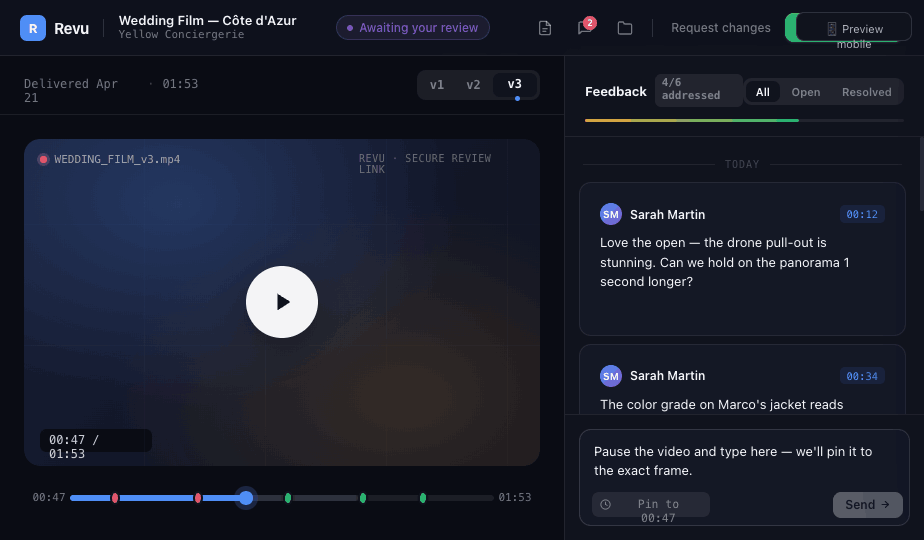
If you use a review tool, the form’s job is done by the timeline: the client pins each note to a frame, and you can count the round. Read how to get useful client feedback on a video for the full workflow.
Frequently asked questions
What is a video revision request form?
A single sheet a client fills in to request a round of changes. It names the project and version, the round number, and lists each change with a timecode, so feedback arrives as one consolidated list.
When should I send the form to the client?
Send it with the first cut, together with your revision policy, so the client knows from the start what a round looks like.
Is this form legal advice or a contract?
No. It is a working template. Put the number of included rounds in your contract or revision policy, and have a professional review contracts for larger projects.